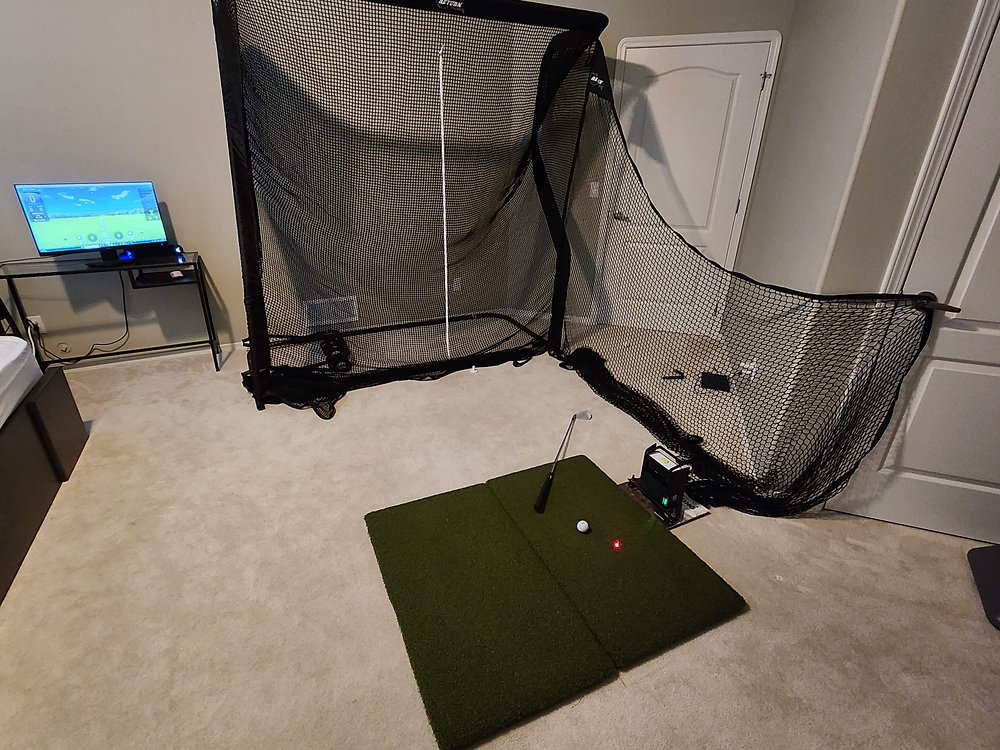
When you imagine a golf simulator, you probably picture a $15,000 dedicated room with a massive impact screen, a ceiling-mounted projector, and a launch monitor that costs more than a used car. That's the dream — but it's not the reality for most golfers.
The good news? You don't need to spend five figures to build a functional, accurate, and genuinely fun golf simulator at home. A budget of $1,000 or less can absolutely get you there — if you know what to prioritize, where to save, and what gear combinations actually work together.
This guide walks you through the best golf simulator setups under $1,000 in 2026, based on real-world testing, community feedback, and careful consideration of what matters most: accuracy, durability, software value, and space requirements.
Whether you're an absolute beginner wanting to survive winter without losing your swing, or a budget-conscious golfer building a first simulator for your garage, you'll find a setup here that fits.
What You Can (and Can't) Expect for Under $1,000

Let's be realistic from the start. A sub-$1,000 simulator won't give you:
Professional-grade club data (club path, face angle, attack angle measured optically with high precision)
A full enclosure with a premium impact screen
A high-end projector with 4K resolution
A massive hitting area suitable for left- and right-handed players simultaneously without adjustment
But it can give you:
Accurate ball data: Ball speed, launch angle, spin axis, carry distance, and total distance — enough for meaningful practice and game improvement
Course play: Access to virtual golf courses, often with subscription fees, but occasionally bundled or free
A net and mat setup that protects your space and your joints
Gamified practice, driving ranges, and skill challenges
Simulation golf that's genuinely fun for friends and family
The key is understanding that at this budget, you're buying a sensor-based or radar-based launch monitor paired with simulation software, a hitting net, and a mat. Your "screen" will likely be an iPad, phone, or a TV mounted nearby — not a projection onto an impact screen. And that's perfectly fine.
The Two Paths to a Budget Simulator in 2026
You've essentially got two routes to stay under $1,000 while getting real simulation:
Path 1: The All-in-One Radar Unit + Budget Accessories
This route uses a portable radar launch monitor that sits behind you (for indoor use) and connects to simulation software on your phone or tablet. Add a net and mat, and you're golfing.
Best for: Garage setups, temporary setups, golfers who want course play and outdoor range use from the same device.
Path 2: The Photometric / Camera-Based Unit + Accessories
Some newer budget launch monitors use high-speed cameras (often in a small, floor-level unit beside the ball) to measure ball data. These require less space behind the ball — a big advantage in tight rooms.
Best for: Smaller indoor spaces, permanent setups where you don't want to move the unit between shots for left/right players, and those who prioritize accuracy over convenience.
Let's look at the best launch monitors in each category.
Best Launch Monitors for Under $1,000 in 2026
Here are the top three options that leave enough budget for a net, mat, and possibly software.
1. Garmin Approach R10 — The Budget King
Price: Approximately $600
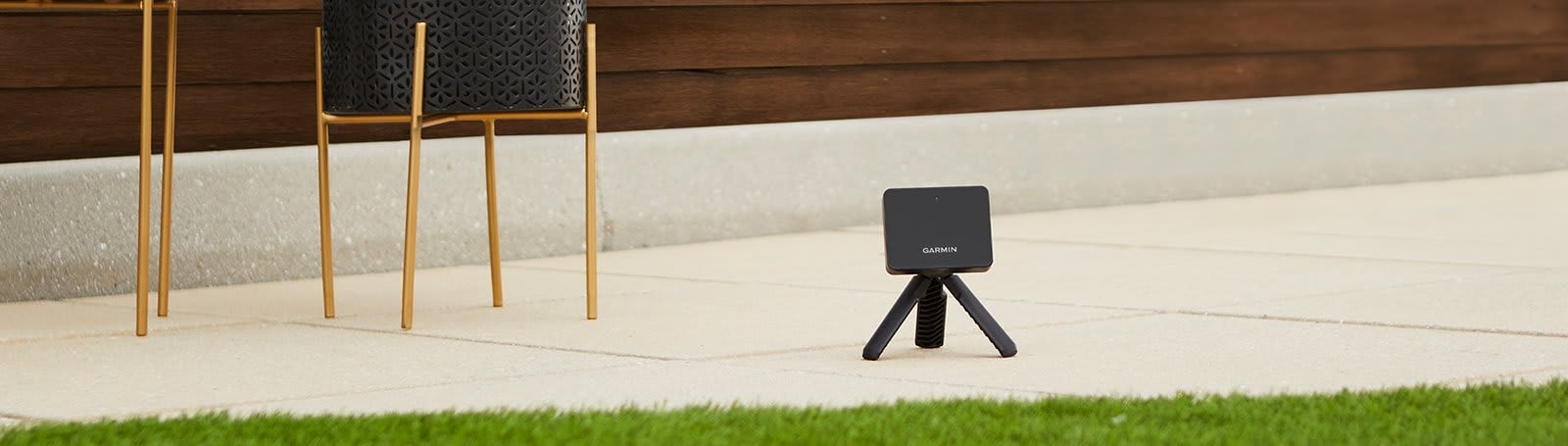
The Garmin R10 remains the most popular golf simulator entry point as of 2026. It's a doppler radar unit that's dead simple to set up and connects to the free Garmin Golf app, which includes a surprisingly good Home Tee Hero course simulation with over 42,000 mapped courses. The annual subscription for Home Tee Hero is about $100 per year — much cheaper than competing sim software.
What makes it great for simulation:
Home Tee Hero is included in the Garmin Golf ecosystem and gives you access to an absurd number of real courses
No phone/tablet hardware bottlenecks — runs smoothly on most modern devices
Awesome Golf and E6 Connect also compatible
Portable, durable, and works as a range device outdoors with no subscription needed for basic data
What to watch out for:
Accuracy indoors degrades without careful environment setup (foam balls, metallic objects, and certain net fabrics can confuse radar)
Spin axis accuracy isn't as solid as camera-based units — expect occasional misreads, especially with driver
Needs 7 to 8 feet behind the ball and 8 feet or more of ball flight
2. Rapsodo MLM2Pro — Best Overall Value
Price: Approximately $700

The Rapsodo MLM2Pro has become the budget simulator darling for good reason. It's a radar and camera hybrid that delivers spin axis measurement (crucial for seeing your ball flight shape) via specially marked Callaway RPT balls. Without the marked balls, you still get solid data, but spin axis won't appear — so for simulation, you'll want the RPT balls or the newer Titleist RCT-compatible mode.
What makes it great for simulation:
Awesome Golf integration (subscription required, roughly 350peryear∗∗or∗∗350peryear∗∗or∗∗35 per month) gives you 30+ courses, driving range, and skill games
E6 Connect integration provides photorealistic courses (subscription or one-time purchase)
Direct connection to iOS and Android devices — no expensive gaming PC required
Works indoors and outdoors with reasonable space requirements (about 8 feet behind ball for radar)
What to watch out for:
Indoor radar needs space from your net to the wall behind it to avoid interference
The subscription cost adds up over time — factor it into your long-term budget
3. Phigolf 2 — The Dark Horse (Sensor-Based, Not a Launch Monitor)
Price: Approximately 250to250to300
This is fundamentally different. The Phigolf 2 is a swing stick with a weighted training club or sensor attachment that measures your club path, face angle, tempo, and swing speed through motion sensors — not your ball. It then simulates ball flight in their impressive WGT Golf integration.
What makes it great for simulation:
Zero space required — you can use it in a bedroom, living room, or even a hotel room
WGT Golf by Topgolf is included with the sensor — that's photorealistic courses like Pebble Beach, St Andrews, and Bethpage Black, with no subscription required
Fantastic gamified practice with weekly tournaments, challenges, and career mode
Near silent — no ball impact, no net needed
What to watch out for:
You're not hitting a real ball — if you want to see actual ball flight and practice real strike, this won't satisfy
The swing stick doesn't perfectly replicate club weight and feel
Not a substitute for real practice, but excellent for swing tempo, face control awareness, and fun course play
When the Phigolf 2 makes sense: Severe space constraints, no ability to make noise, priority on fun and swing training over ball striking, keeping costs extremely low while still accessing world-class course simulation.
Building Out the Rest of Your Setup
Now that you've chosen a launch monitor (or clever alternative), let's allocate the remaining budget. You've got roughly $300 to $700 left for a net, mat, and incidentals.
Hitting Nets: $70 to $200
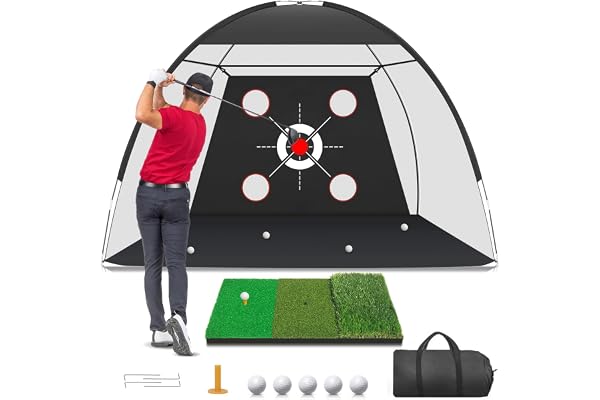
Your net doesn't need to be elaborate, but it needs to stop real golf balls safely and repeatedly. Some standouts:
Spornia SPG-7 (Approximately $200): The best budget net that's easy to set up, has automatic ball return, and works indoors/outdoors. Pricier but worth it if your budget allows.
Net Return Home Series V2 (Approximately $400): Stretches the budget, but it's frame-durable enough to last years and returns your ball. Consider this if the mat section is cheap.
GoSports 7 ft x 7 ft or 10 ft x 7 ft Net (Approximately 70to70to120): Basic but effective. Add a separate impact target cloth for longevity.
Rukket Haack Net (Approximately $130): Designed with a pro, surprisingly robust, and thick netting reduces pass-through risk.
Golf Mats: $50 to $300
Don't cheap out completely on a mat. A $30 Amazon mat will punish your wrists, elbows, and shoulders over time while encouraging a scoopy swing because you're afraid of fat shots.
GoSports Pro 5 ft x 4 ft mat (Approximately $150 to $200): Reasonable shock absorption, realistic enough feel, and widely available.
Fiberbuilt Flight Deck (Approximately $100): A small but excellent hitting strip you can stand beside on a cheaper stance mat. Your joints will thank you.
Country Club Elite Real Feel Strip (Approximately $70): Just the hitting strip — pair with foam puzzle mats for a full stance area. Same joint-saving philosophy.
Rawhide Grade B Mat (Approximately $150 to $250): Commercial-grade mats sold as "seconds" — huge (often 4 ft x 6 ft), extremely durable, and you're basically getting a $500 mat with minor cosmetic flaws.
The "Screen": $0 (You Already Have It)
At this budget, your display will be:
An iPad or tablet sitting on a stand adjacent to your hitting area
A TV or monitor mounted on the wall or on a rolling cart
Your smartphone — usable for range sessions but a bit small for course play with friends
Complete Setup Recommendations
Setup 1: The "Serious Simulator" ($950 Total)
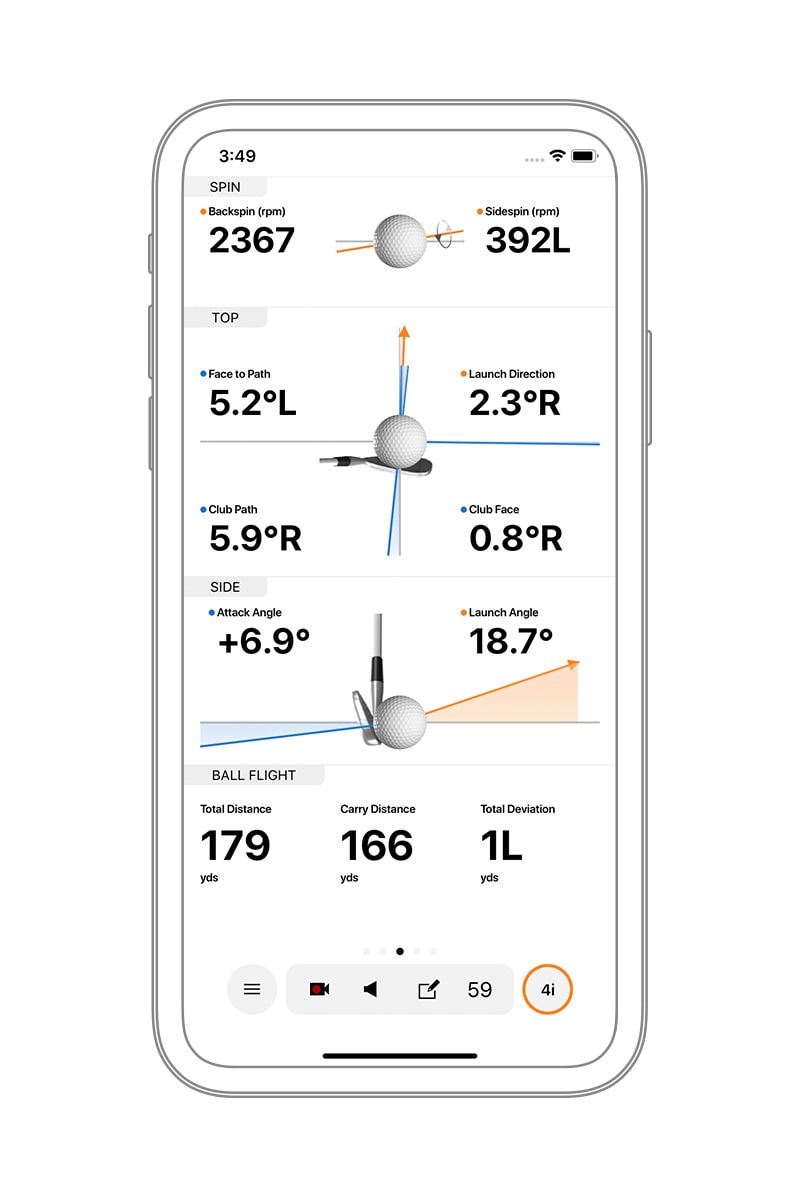
Launch Monitor: Garmin Approach R10 — $600
Net: GoSports 7 ft x 7 ft Net — $70
Mat: GoSports Pro 5 ft x 4 ft — $180
Software: Garmin Golf app free tier (range) + 1st year Home Tee Hero — $100
Total: $950
Why this works: Access to 42,000 courses for a year, accurate enough for meaningful practice, straightforward setup. Spend the remaining $50 on alignment sticks or a cheap tablet stand.
Setup 2: The "Accuracy First" Setup ($980 Total)
Launch Monitor: Rapsodo MLM2Pro — $700
Net: Rukket Haack Net — $130
Mat: Fiberbuilt Flight Deck — $100
Software: Awesome Golf trial included, then $35 per month (first month free)
RPT balls: Limited pack included; extra dozen — $50
Total: $980 + ongoing subscription
Why this works: The spin axis measurement sets this apart. Even on a tablet screen, seeing your actual draw and fade shapes gives you real feedback. The Flight Deck saves your wrists while you save up for a better stance mat.
Setup 3: The "Ultra-Compact 500Setup" ($290 to $520 Total)
Swing Sensor + Simulation: Phigolf 2 — $250
No net required — $0
No mat required (or a basic foam mat for comfort) — $20
Device mount: Phone/tablet tripod — $20
WGT Golf courses: Included with no subscription
Remaining budget: $230 saved or put toward a future launch monitor upgrade
Why this works: If you genuinely cannot fit a net-and-launch-monitor setup into your living space, the Phigolf gives you Pebble Beach on your TV with swing feedback that's surprisingly useful. It's also a great party game.
Space Requirements: The Hidden Dealbreaker
Before you order anything, measure. Here's what these systems need:
Radar units (R10, MLM2Pro) indoors:
At least 8 feet from radar unit to net
About 7 feet behind the ball for the unit itself
Ceiling height: You need to swing driver freely. For most, that's 9 feet minimum, though 8.5 feet works for shorter golfers who don't have a steep swing
Width: 10 feet is comfortable; 8 feet can work if you're centered and not swinging wildly offline
Photometric/camera units (like a used SkyTrak, if you find one under budget):
Only need about 12 to 18 inches beside the ball — much less depth required
Same ceiling and width requirements apply
The Phigolf 2 needs whatever space you can swing a short training club — often just 7-foot ceilings and very narrow width.
If your space is borderline, radar units will struggle. Reflective surfaces, concrete floors, and certain fluorescent lights add interference. Budget setups work best in garages with rubber mats, basements with carpet, or spare bedrooms where you can control the environment.
Software & Subscription Costs: The Real Long-Term Expense
The hardware is a one-time cost. Software often isn't. Here's what to expect:
Platform | Upfront Cost | Subscription | Best With |
|---|---|---|---|
Garmin Golf (Home Tee Hero) | Free app | 100peryearor100peryearor10 per month | R10 |
Awesome Golf | Free app | 350peryearor350peryearor35 per month | R10, MLM2Pro |
E6 Connect | Free basic tier; Expanded courses extra | 300peryearor300peryearor30 per month premium | R10, MLM2Pro |
WGT Golf (Phigolf 2) | Included | None | Phigolf 2 |
Rapsodo Premium | Included with MLM2Pro | $200 per year for full features including slow-mo capture | MLM2Pro |
The Garmin Home Tee Hero subscription is the best value in simulation. The graphics aren't E6-level photorealistic, but playing recognizable real courses for just $100 per year is hard to beat at this budget.
If you want stunning graphics and don't mind the subscription, Awesome Golf on a recent iPad looks fantastic and has excellent game modes.
What the Community Says: Real Reviews Summarized
Across Reddit's r/Golfsimulator, YouTube reviews from channels like Let's Play Thru and Breaking Eighty, and various forums, the consensus in 2026 is:
R10 owners are generally happy at the price point but many upgrade within 1 to 2 years as accuracy demands grow. Almost all say it made them better golfers by providing instant feedback.
MLM2Pro owners rave about spin axis accuracy and the camera integration. The primary complaints are subscription costs and occasional connectivity issues.
Phigolf 2 users — often city-dwellers — are shocked by how much fun WGT is and how much swing awareness they gain, but they universally acknowledge it doesn't replace ball-striking practice.
Common thread: Any of these setups will improve your game if you use them regularly. The golfers who benefit most aren't the ones with the most expensive gear, but the ones who commit to structured practice rather than just whacking balls.
Where to Buy and Support
The major online retailers carry all of the above equipment. You can find the Garmin Approach R10 and Rapsodo MLM2Pro on Amazon, at specialized golf retailers like Carl's Place and Top Shelf Golf, and on the manufacturers' official websites. The Phigolf 2 is widely available online, and nets and mats from Spornia, Net Return, GoSports, and Fiberbuilt can be found at major sporting goods stores like Dick's Sporting Goods.
For more setup inspiration, detailed guides, and product reviews, visit our homepage at HomeGolfSetup — we cover everything from tiny apartment builds to dedicated garage simulators. You can also consult trusted review sites like Breaking Eighty for in-depth, hands-on launch monitor testing.
Final Advice: Start Simple, Upgrade Later
The biggest mistake budget simulator buyers make is trying to buy everything at once with compromises on every component. Instead:
Put your money in the launch monitor first — it's the engine. The R10 or MLM2Pro are the clear winners here.
Get a safe net and a joint-friendly hitting strip, even if it means a smaller stance area.
Use your iPad or TV as the display for the first year.
Upgrade the mat and add a projector later, as budget allows.
A $1,000 simulator won't make you feel like you're at a commercial TrackMan bay, but it will let you play rounds in January, groove your 7-iron distance, and host friends for beers and closest-to-the-pin contests. That's worth every penny.
Disclosure: This article may contain affiliate links. When you purchase through links on our site, we may earn a commission at no additional cost to you. Our recommendations are based on research, hands-on testing where possible, and community feedback. We strive to recommend gear that genuinely offers the best value.
Frequently asked questions
Independent golf equipment reviewer. Tests every product in real home conditions before publishing a verdict. No paid placements.
Related guides
Affiliate disclosure: We earn a small commission if you buy through our links — this never influences our scores or recommendations. Learn more


