What Is a Golf Launch Monitor?
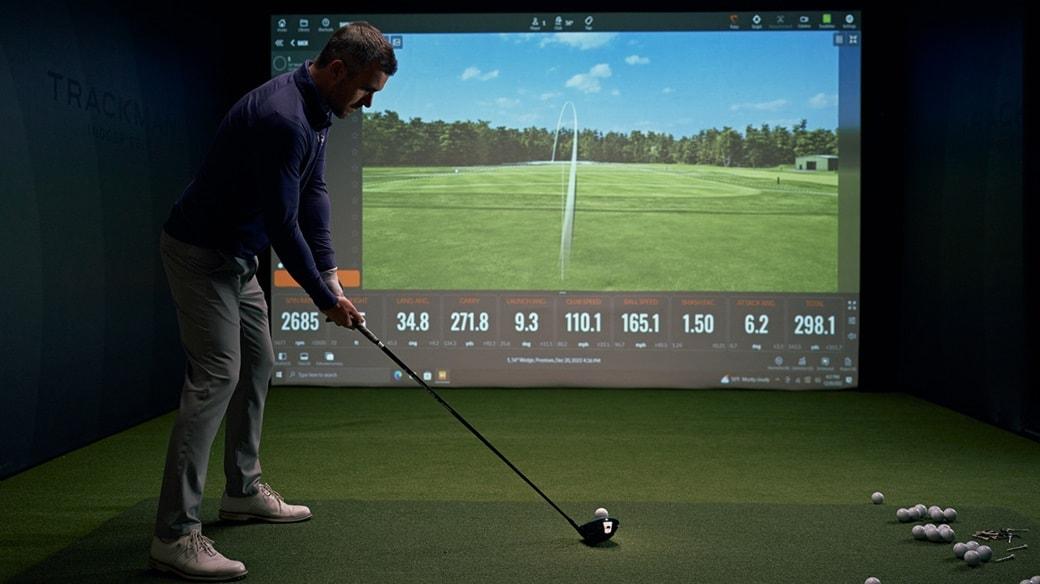
A golf launch monitor is an electronic device that captures data from your club and ball at the moment of impact — and during the first critical feet of ball flight — to calculate everything from carry distance to spin rate. Think of it as a diagnostic tool that replaces guesswork with numbers.

For experienced golfers, a launch monitor is not just a gadget. It is the engine behind a home golf simulator, a club-fitting session, and a structured practice routine. Without one, you are hitting balls into a net and hoping. With one, every swing produces actionable feedback.
The technology inside a launch monitor falls into two distinct categories: camera-based (photometric) systems and radar-based (Doppler) systems. Each has real strengths and real limitations — and which one you should choose in 2026 depends entirely on how and where you plan to use it.
At HomeGolfSetup, we have tested and used both types across garage setups, basement bays, and outdoor range mats. This guide covers everything you need to make a confident decision without wasting money on the wrong technology.
Key Data Points You Should Care About
Before comparing technologies, it helps to know what data you actually need. Not all launch monitors measure the same parameters, and paying for metrics you will never use is a common mistake.

Ball Data (measured directly by most monitors):
Ball Speed — The single most important driver of distance. Everything else is downstream from here.
Launch Angle — The initial vertical angle of the ball as it leaves the face. Critical for dialing in your carry.
Spin Rate (total, backspin, sidespin) — Influences carry height, stopping power, and shot shape.
Carry Distance — How far the ball flies before landing.
Side Angle / Spin Axis — Tells you the direction the ball will curve.
Club Data (measured by mid-to-high-end monitors):
Club Head Speed — How fast the face is moving at impact.
Smash Factor — Ball speed divided by club speed. A measure of impact efficiency.
Club Path and Face Angle — The directional data that explains your miss pattern.
Angle of Attack — Is your driver swing going up or down at impact? This number matters for maximizing distance.
Dynamic Loft — The effective loft delivered at impact, not the loft stamped on the club.
If your goal is pure distance measurement and basic practice, ball data alone is sufficient. If you want to work on your swing mechanics — fixing a slice, improving your launch conditions, or doing your own club fitting — you need club data too.
For a deeper look at how these numbers translate to on-course improvement, see our guide on how to use launch monitor data to lower your handicap.
Camera-Based vs. Radar-Based: The Core Technology Debate
This is the question at the heart of every launch monitor purchase in 2026. Let us break it down clearly.

Camera-Based (Photometric) Systems
Camera-based launch monitors use high-speed cameras — sometimes two, sometimes four — to photograph the ball at the exact moment of impact and during the first few inches of flight. By analyzing the images frame by frame, the system calculates ball speed, spin, launch angle, and in higher-end models, precise club data.
How they work: The ball typically needs to be within a defined capture zone, usually a mat in front of the unit. The cameras photograph dot patterns or reflective markers on the ball at incredibly high frame rates. The software then derives all measurements from those images.
Strengths of camera-based systems:
Outstanding accuracy indoors, even in tight spaces
No minimum ball-flight distance required — they can work in very short hitting bays
Generally more accurate for spin rate data, especially side spin
No club stickers required on most modern models (Foresight GC3, SkyTrak+, Bushnell Launch Pro)
Premium models like the Foresight GCQuad and Trackman 4 (which uses dual radar plus a camera) deliver tour-level accuracy
Weaknesses of camera-based systems:
Sensitive to lighting conditions — a strong glare or inconsistent light source can affect readings
Outdoor performance on older models was weaker, though modern hybrid systems have addressed this significantly
Some earlier models required special balls or stickers for club tracking — confirm before you buy
Radar-Based (Doppler) Systems
Radar launch monitors use microwave radio waves to track the ball through the air. The radar antenna emits a signal, the ball disrupts it, and the system measures the Doppler shift in frequency to calculate speed, trajectory, and spin.
How they work: The radar unit typically sits behind the golfer, angled slightly upward to track ball flight. Some units sit to the side. The radar tracks the ball for a longer distance than camera systems — sometimes for 15 to 30 feet of actual flight — which is one reason radar data can be highly reliable for distance.
Strengths of radar-based systems:
Excellent for outdoor use — radar is not affected by ambient lighting
Typically more portable and lightweight (FlightScope Mevo Gen2, Garmin Approach R10)
Better at tracking longer ball flights, which improves carry-distance accuracy at the range
Entry-level radar units now offer compelling accuracy at lower price points
Weaknesses of radar-based systems:
Require more physical space behind the golfer — some units need 8 to 10 feet of clearance
Indoor performance can be affected by tight ceilings, walls, and metal structures interfering with the radar signal
Spin data has historically been less precise than camera-based competitors, though newer models have narrowed this gap with proprietary algorithms
The Hybrid Approach: Best of Both Worlds
The most accurate systems in 2026 combine both technologies. The SkyTrak+ pairs a photometric camera with dual Doppler radar. The Trackman 4 fuses a dual-radar system with an onboard HD camera. These hybrid designs compensate for the weaknesses in each standalone technology, which is why they lead the market for accuracy.
For a full side-by-side comparison of the top models, see our complete launch monitor comparison chart.
Indoor vs. Outdoor Performance
Your intended environment is arguably the single most important filter when choosing a launch monitor. A device that excels in a simulator bay may frustrate you at the driving range, and vice versa.

Best for Indoor Use
Camera-based and hybrid systems dominate indoors. Here is why: the controlled lighting of a simulator bay suits photometric systems perfectly. There is no sunlight glare, no wind, and no requirement for a long ball flight. Camera systems like the Foresight GC3, Bushnell Launch Pro, and Uneekor EYE MINI are designed to capture a full data set within the first few inches of ball flight — which is all you need when the ball is about to hit a screen 12 feet away.
Radar systems can work indoors, but require attention to a few factors. The unit needs enough clearance behind the golfer to capture adequate data before the radar signal bounces off walls. Most radar units recommend at least 8 to 10 feet of space behind the hitting area. In a very tight garage bay, this can be a problem.
Lighting matters more than most buyers realize. Camera-based systems in particular need consistent illumination. Direct sunlight streaming through a garage window can create high-contrast shadows that confuse the image-capture system. If your hitting bay has variable natural light, consider installing LED shop lights to create a consistent environment — a detail we cover in our home simulator room setup guide.
Best for Outdoor Use
Radar wins outdoors, hands down. The driving range is radar's home territory. Units like the FlightScope Mevo Gen2 and Garmin Approach R10 and R50 were built to be portable and work under any lighting conditions. You set them down, connect via the app, and start hitting. The radar tracks the ball through real flight, which is exactly what it was designed to do.
Camera-based systems have made major strides outdoors in recent years. The SkyTrak+ and Bushnell Launch Pro, both of which combine cameras with supplemental sensors, now perform reliably outside. But if your primary use case is outdoor range sessions, a portable radar unit is still the simpler, more consistent choice.
Designed for Both Environments
Several mid-range units in 2026 are genuinely capable in both settings, giving you flexibility as your setup evolves. The FlightScope Mevo Gen2, the SkyTrak+, and the Rapsodo MLM2PRO all offer credible indoor and outdoor performance. These are the monitors to consider if you plan to split time between a home bay and outdoor range work.
Price Tiers Explained: Budget to Pro
The launch monitor market in 2026 spans an enormous price range — from under $400 to over $20,000. Understanding what each tier actually delivers prevents you from either underspending (and getting frustrated with inaccurate data) or overspending on precision you do not need.
Entry Level: Under $1,000
At this price point, you are primarily getting ball data: carry distance, ball speed, and launch angle. Club data is limited or absent. Spin accuracy is the weakest link in this tier.
The Garmin Approach R10 (~$400–$500) remains the benchmark for this category. It connects to E6 Connect and integrates with the Garmin Golf app to give you access to thousands of virtual courses. For a golfer building their first home setup or wanting to track gapping at the range, it delivers genuine value. The Garmin Approach R50 has since entered as a premium step-up in the brand's lineup, offering enhanced accuracy and an all-in-one experience closer to the mid-range tier.
The Rapsodo MLM2PRO (~$700) uses a camera and sits just below the mid-range cutoff. It works both indoors and outdoors and measures a solid set of ball and club data, making it one of the better values in this tier for golfers who want more than just carry distance.
If you are building a budget home simulator, check out our guide on the best launch monitors under $1,000 for home setups.
Mid Range: $1,000–$4,000
This is the sweet spot for serious home golfers. At this level, you get full club data, reliable spin measurement, proper simulator integration, and enough accuracy that the data is genuinely trustworthy for making equipment decisions.
Key models in this tier include:
FlightScope Mevo Gen2 (~$1,299) — The successor to the Mevo+, with better hardware, improved club data accuracy, and excellent outdoor performance. Radar-based and highly portable.
SkyTrak+ (~$1,795 on closeout; ST MAX at ~$2,995) — Camera plus dual radar hybrid. Outstanding simulator experience, strong indoor accuracy, Mac compatible, and the only official launch monitor of GOLFTEC.
Bushnell Launch Pro (~$3,000 device, plus subscription) — Camera and infrared combo using Foresight Sports technology. Exceptional accuracy and strong outdoor performance, though the subscription model adds to total cost.
High End: $4,000–$10,000
At this level, you are buying tour-grade accuracy and typically overhead or fixed installation systems for a dedicated simulator room.
Uneekor EYE MINI / EYE MINI Lite — Overhead photometric systems that require ceiling mounting. Outstanding accuracy for dedicated home bays.
Foresight Sports GC3 — Ground-based, camera-driven, delivers full ball and club data with tour-caliber precision.
ProTee VX — Ceiling-mounted system with no subscription, a compelling value for permanent installations.
Professional Tier: $10,000+
The Foresight Sports GCQuad / QuadMAX, Trackman 4, and Uneekor EYE XO2 occupy this space. These are the devices used in tour fitting studios, top-tier instruction facilities, and professional practice environments. For most home golfers, the accuracy gains over the $3,000–$5,000 tier are marginal relative to the cost jump. These are not the right answer unless you are running a commercial operation or doing professional fitting work.
You can explore premium simulator packages built around these monitors in our golf simulator store.
Top Launch Monitors in 2026 by Category
Here is a quick-reference summary of the leading options by intended use case:
Use Case | Top Pick | Runner-Up |
|---|---|---|
Best Budget (Under $500) | Garmin Approach R10 | Shot Scope LM1 |
Best Mid-Range | FlightScope Mevo Gen2 | SkyTrak+ |
Best for Home Simulator | SkyTrak+ / ST MAX | Bushnell Launch Pro |
Best Outdoor / Range | Garmin Approach R50 | Mevo Gen2 |
Best for Club Fitting | Foresight GC3 | Bushnell Launch Pro |
Best Overhead / Ceiling | Uneekor EYE MINI | ProTee VX |
Best Mac Compatible | SkyTrak ST MAX | SkyTrak+ |
Best Tour Accuracy | Trackman 4 | Foresight GCQuad |
Which Technology Is Right for Your Setup?
To make this practical, work through these four questions before committing to any purchase:
1. Where will you use it most — indoors, outdoors, or both? If primarily indoors: camera-based or hybrid. If primarily outdoors: radar-based. If both: a hybrid or versatile radar unit.
2. What is your ceiling height? If your simulator bay has under 9 feet of ceiling clearance, overhead-mounted systems are out. If your space is under 16 feet deep, verify that any radar unit can operate in your space. Camera-based ground units require the least space.
3. Do you need full club data? If you are working on swing mechanics, fixing miss patterns, or doing your own club fitting, yes. If you are tracking distances and playing sim golf, ball data may be sufficient.
4. What is your realistic total budget — including subscriptions? The device price is not the full story. Budget $200–$500 per year for simulation software on many mid-range units. Some overhead systems like the ProTee VX carry no subscription, which makes them cheaper long-term despite higher upfront costs.
Subscription Costs: The Hidden Budget Item
One of the most common mistakes experienced golfers make is looking at device price alone. The ongoing cost of simulator software subscriptions adds up significantly over time and varies widely by brand.
SkyTrak / ST MAX: Basic plan is free (range + PinSeeker games). Course Play subscriptions run $99–$499/year.
Bushnell Launch Pro: Silver plan ~$199/year, Gold ~$499/year (required for full simulator functionality via FSX Play software).
Garmin Approach R10/R50: Garmin Golf app subscription varies; third-party software like E6 Connect adds cost.
ProTee VX: No subscription required. The $6,500 device price includes the software platform permanently.
Uneekor systems: GSPro ($250/year) or TGC2019 are popular software pairings; Uneekor's own software included.
Over a five-year ownership period, a "cheap" device with an expensive software plan can easily exceed the total cost of a "expensive" device with no subscription. Factor this into your decision.
Space Requirements Before You Buy

Even the best launch monitor delivers poor results in the wrong physical environment. These are the minimum space requirements you should verify before purchasing any system:
Absolute minimums for any home setup:
Ceiling height: 9 feet (for golfers under 5'10"); 9.5–10 feet for taller players
Room width: 10 feet
Room depth: 15–16 feet minimum; 18+ feet ideal
Camera-based ground units (SkyTrak+, Bushnell Launch Pro, Foresight GC3):
Require the least depth; the unit sits level with the hitting area
Can function in 12 feet of depth in a tight bay
Radar-based portable units (Mevo Gen2, Garmin R10/R50):
Need 8–10 feet of clearance behind the golfer
Total room depth of 16–20 feet strongly recommended
Overhead/ceiling-mounted units (Uneekor EYE MINI, ProTee VX):
Require ceiling height of at least 9.5 feet for proper mounting angle
Once installed, no floor space is consumed by the device itself — a significant advantage for golfers who also want to accommodate left and right-handed players in the same bay
For a complete room layout walkthrough, including recommended positioning for your monitor, screen, and projector, see our simulator room dimensions and planning guide.
5 Mistakes to Avoid When Buying a Launch Monitor
Having spoken with hundreds of golfers building home setups, these are the errors that come up again and again:
1. Choosing based on device price alone, ignoring subscription costs. A $1,299 radar unit that needs $500/year in software costs more than a $3,000 camera unit with minimal subscription requirements over a five-year window. Always calculate total cost of ownership.
2. Buying a radar unit for a very tight indoor space. Radar needs room behind you to work correctly. If your hitting area has less than 8 feet behind the ball position, you are better served by a ground-level camera system.
3. Expecting entry-level club data to be reliable. Ball data (carry, ball speed, launch angle) at the under-$500 tier is solid. Club data (face angle, path, attack angle) at that price is less precise. If you are paying for club data, make sure you are in the mid-range tier where it is actually reliable.
4. Overlooking the lighting requirements for camera-based systems. Variable natural light — a garage door that opens, skylights, or windows — creates inconsistent readings for photometric systems. Plan your lighting setup before, not after, your purchase.
5. Not verifying compatibility with your preferred simulator software. Your launch monitor needs to talk to the software you want to play. Most major simulators (E6 Connect, GSPro, TGC2019, FSX Play) support the leading monitors, but not every combination works. Check the software compatibility list for the specific device before buying.
For more buying pitfalls specific to simulator packages, read our complete home golf simulator buying guide.
Additional Resources
For further reference, two authoritative external resources are worth bookmarking:
Golf Monthly's Best Launch Monitors 2026 Guide — An independent editorial team with hands-on testing reviews the top current models across all price points: golfmonthly.com/best-golf-deals/best-golf-launch-monitors-213610
Carl's Place Launch Monitor Buying Guide — A detailed breakdown of monitor types, placement, and how to choose based on your simulator room: carlofet.com/blog/how-to-choose-a-golf-simulator-launch-monitor
The HomeGolfSetup editorial team tests and reviews golf simulator and launch monitor products across a range of real-world setups. All product assessments reflect hands-on experience. This article may contain affiliate links to products we recommend. Your purchase price is not affected.
Frequently asked questions
Independent golf equipment reviewer. Tests every product in real home conditions before publishing a verdict. No paid placements.
Related guides
Affiliate disclosure: We earn a small commission if you buy through our links — this never influences our scores or recommendations. Learn more


